

The operating system for businesses that subcontract work
Know your margin before the job is done.
Project Ledger puts each job's client contracts and vendor contracts side by side, so Expected Revenue, Expected Cost and Expected Margin live on the project page — not in a spreadsheet you rebuild at month-end.
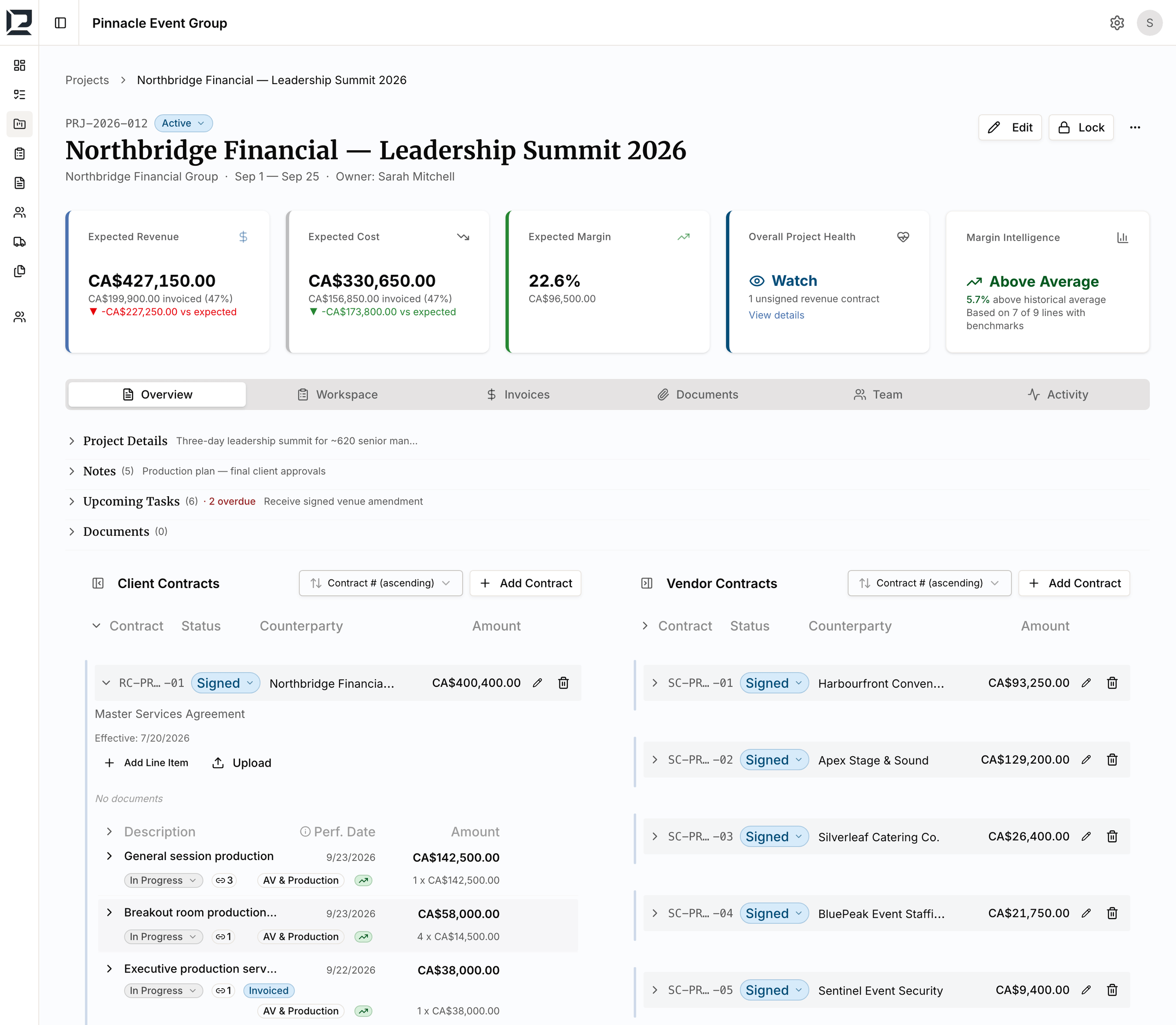
You win the job. You subcontract it. You own the margin.
Every project has a revenue side and a cost side. The margin between them is yours to keep or lose. Most teams can't see it clearly until the job is closed.
Event production
You sell the experience, then contract the venue, AV, catering and entertainment that deliver it. Every event is one client contract over a stack of vendor contracts.
Air charter brokerage
You sell the trip, then source the aircraft from operators. Every charter pairs a client price with an operator cost, and the spread is the business.
Equipment & specialty sourcing
You sell the package, then source the equipment, vessels or crew from vendors. The client books one engagement; you manage the contracts behind it.
If you win jobs, subcontract the work, and live on the spread — this is for you.
Margin gets lost three ways.
Client contracts in one place, vendor costs in another.
The signed proposal is in a shared drive. Subcontractor quotes are in someone's inbox. Costs are in a spreadsheet that was accurate two weeks ago. Nobody has the full picture of any one job.
You find out margin is blown after the job is done.
A vendor invoice comes in higher than the quote. A scope change never got re-priced. By the time finance closes the books, the money is already spent.
The spreadsheet breaks at 50 jobs.
Fifty projects, a dozen vendors per job, invoices landing in three inboxes — the formulas break and nobody catches it until month-end.
Contracts, invoices, payments
See what has actually happened, not just what was planned.
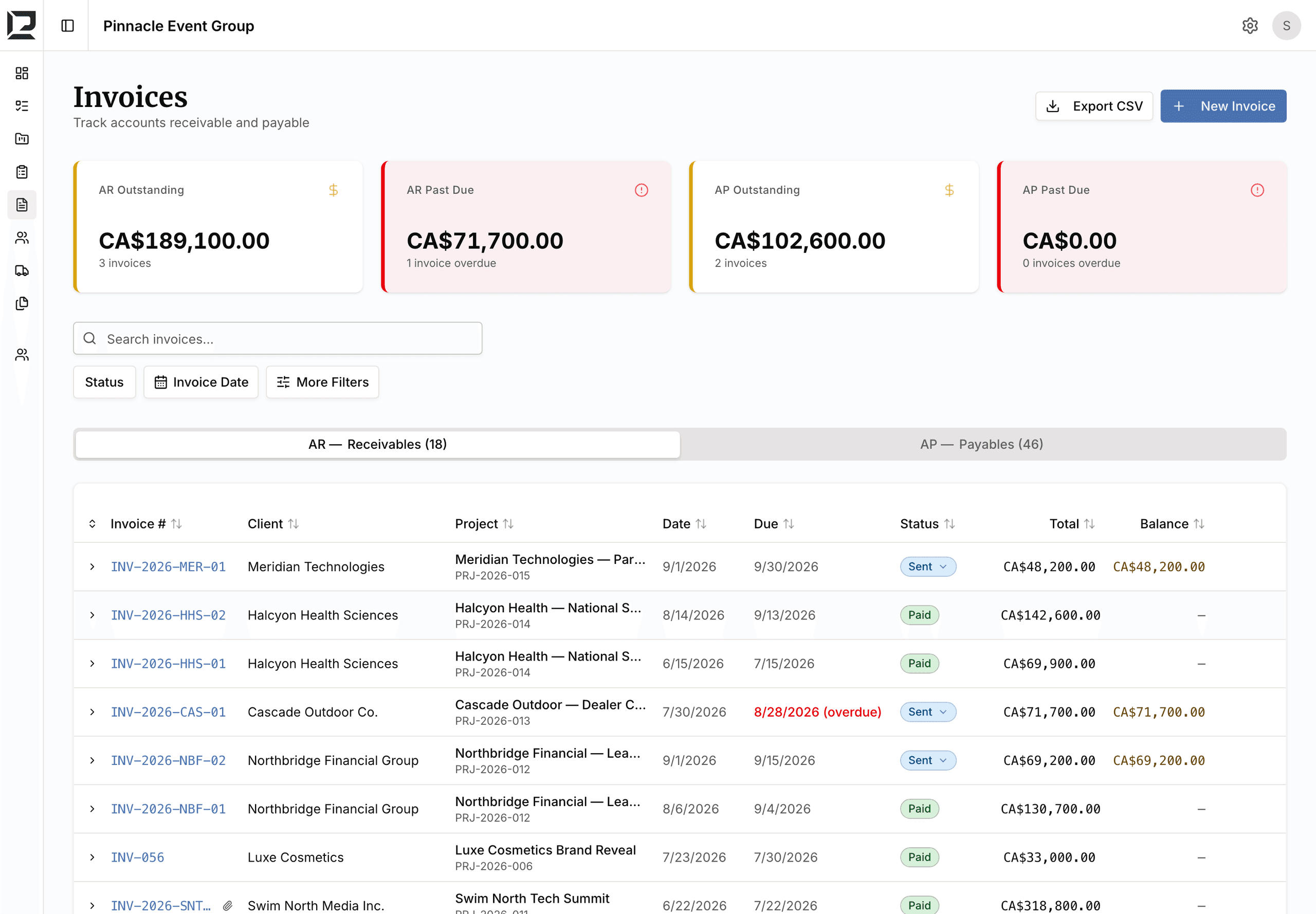
Every project carries its client contracts on the revenue side and its vendor contracts on the cost side, and every invoice and payment lands against them — so the expected figures and the invoiced figures sit on the same page.
- Contracts move Draft → Sent → Signed → Complete, with the contract documents attached.
- AR and AP invoices track Draft, Sent, Partial, Paid and Void, with Record Payment, Write Off and a Payment History.
- Outstanding and Past Due balances roll up to each client and vendor, not just each invoice.
Linked costs
Understand where the margin comes from.
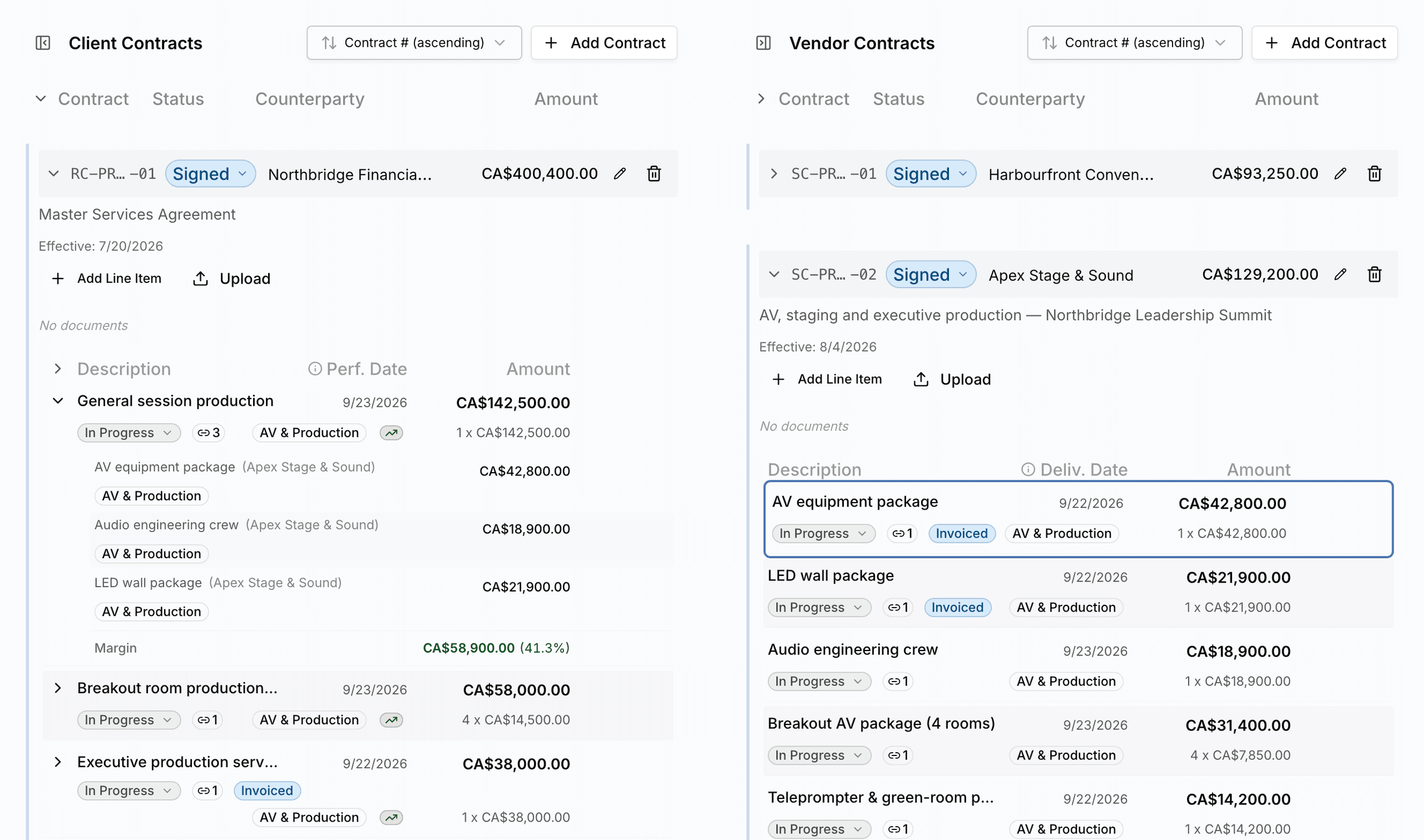
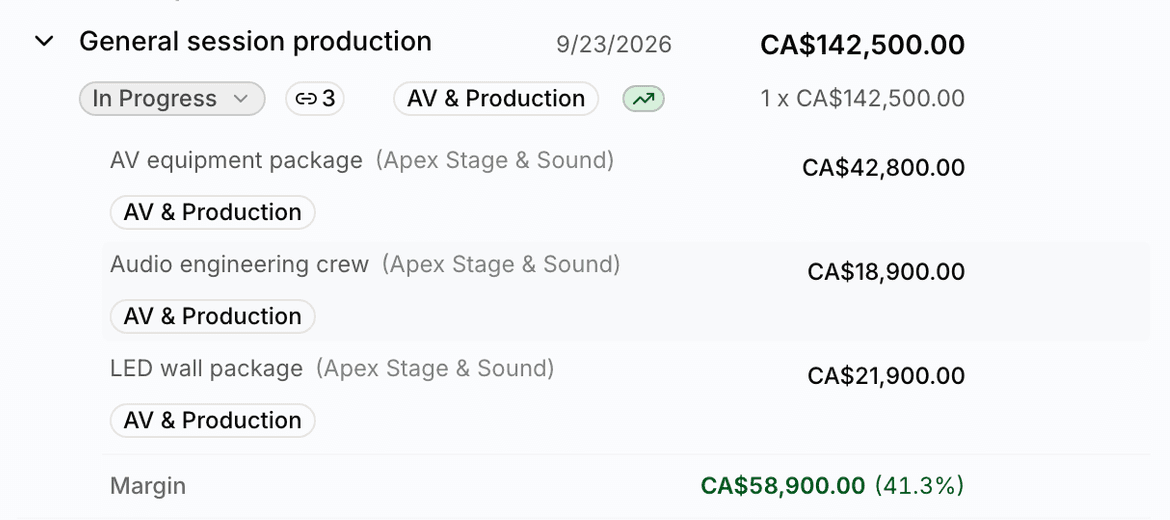
Link each vendor cost line to the revenue line it serves. The Margin row under a revenue line shows what that line earns after its linked costs — so a scope change or a higher vendor quote shows up where it lands, not at month-end.
- Revenue and cost line items carry categories and Performance / Delivery dates.
- Link Cost Items pairs vendor lines to revenue lines, with the margin per line in view.
- The Allocation assistant spreads a vendor invoice across the lines it covers.
Documents, notes, tasks
Keep execution next to the numbers.
Sales sold it, Operations is delivering it, Finance is billing it — and all three work the same project record. The signed contract, the last venue walkthrough note and the open tasks live beside the job's margin, so the team runs it from the place where the money is.
- Documents attach to the project, a client or vendor contract, or an invoice, with secure download and ZIP export.
- Notes with a title, pinning and replies keep the running record of the job in one thread.
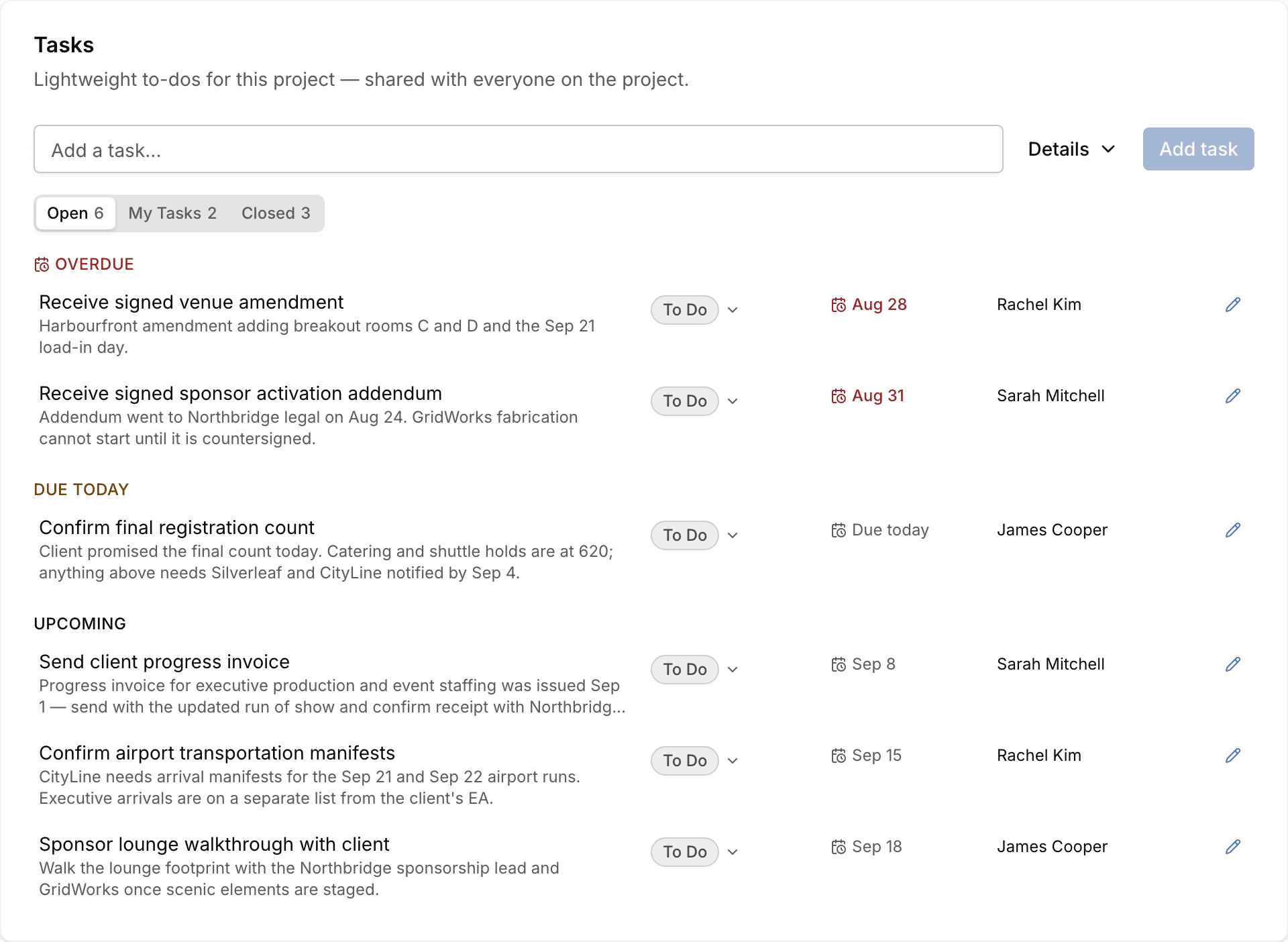
- Tasks carry an assignee, a due date and a status, and sort themselves into Overdue, Due today and Upcoming.
Dashboard, Operations, My Tasks
Manage the whole book.
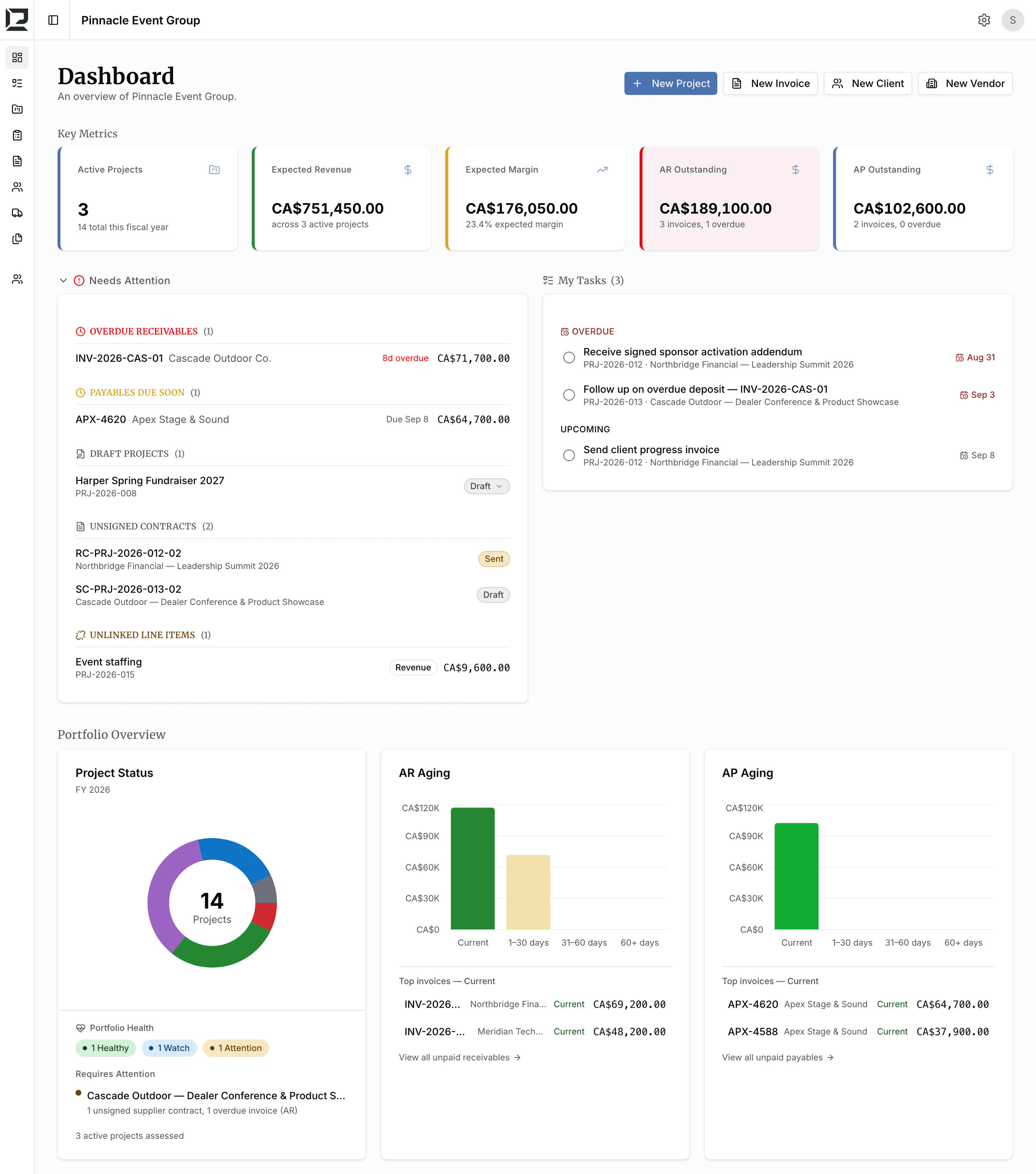
The Dashboard shows revenue, margin and outstanding balances across every active project, and drills through to the invoices, line items and contracts behind each number.
- Needs Attention lists Overdue Receivables, Payables Due Soon, Past Due line items, Drafts, Unsigned Contracts and Unlinked lines.
- Portfolio health rates each project Healthy, Watch, Needs Attention or Critical from its contracts, invoices and dates.
- Operations lists every line item across projects — Due This Week, In Progress, Delivered, Overdue — and My Tasks collects your open work.
Set up a job in minutes. Know where it stands all the way through.
Create the project and add its contracts
One project per job. Add the client contract on the revenue side and each vendor contract on the cost side; every contract is tracked Draft → Sent → Signed → Complete.
Break contracts into line items
Revenue lines and cost lines with categories and Performance or Delivery dates. Expected Revenue, Expected Cost and Expected Margin update as you add them.
Link costs to the revenue they serve
Link Cost Items pairs each vendor line to the revenue line it supports. The Margin row shows what each line earns after its costs.
Invoice and record payments
Raise AR invoices to the client and log AP invoices from vendors — Draft, Sent, Partial, Paid. Balances and overdue items roll up to the project, the client and the vendor.
Run the book from the Dashboard
Project health, Needs Attention, Operations and My Tasks across every job, with drill-through to the detail. Complete & Lock a finished project to fix its realized margin.
Founding Operators
Early access for broker-style businesses helping shape the platform.
Founding rates locked at signup. Currently selecting 25 operators.
- Unlimited projects
- Client and vendor contracts
- Linked costs with per-line margin
- AR/AP invoices and payments
- Project health flags
- Documents, notes and tasks
- Direct founder support
- Influence product roadmap